Smart Content is an innovation powered by artificial intelligence, available in the Sarbacane Campaigns, Forms, Pages, Studio and Sendkit applications. This feature, driven by the power of ChatGPT, provides you with the ability to:
Create new content for your campaigns, forms and pages, according to your needs,
Rephrase or summarize existing texts for you,
Correct and translate your content, thus enabling you to broaden your communication horizons,
Customize the tone and length of your texts so that they perfectly match your target audience,
Generate your email subject lines automatically, or with the help of suggestions,
Generate your email pre-headers automatically, or with the help of suggestions,
Generate customized images to enhance your content (according to your guidelines).
Smart Content is available in: Sarbacane Campaigns, Sarbacane Pages, Sarbacane Forms, and Sarbacane Sendkit via the builder used to create email campaigns, forms and landing pages. The image generation feature is available in Sarbacane Studio.
Smart Content is a feature available in the Smart Content pack (included in the Exclusive subscription).
When using Smart Content for the first time, accept the General Terms of Use after reading them. The feature will then be accessible and ready to use.
Good to know: you can withdraw your individual acceptance in the preferences of each application.
To access the text generation, translation, correction and summarization features, open the editing and creation module: Email Builder for Campaigns & Sendkit, Pages Builder for Pages, and Forms Builder for Forms and the creation/modification of blocks or templates for Studio. When adding a text block, click on the magic wand icon to use the content creation assistant.

To access the subject line and pre-header suggestion features, open the Email Builder editing and creation module in Campaigns. When adding/modifying the subject line and pre-header fields, click on the magic wand icon to use the content creation assistant.
To access the image generation feature, select Generate an image on the Sarbacane Studio home screen, or open the “My images” module in Studio and select “generate an image” in the dropdown menu to use the content creation assistant.
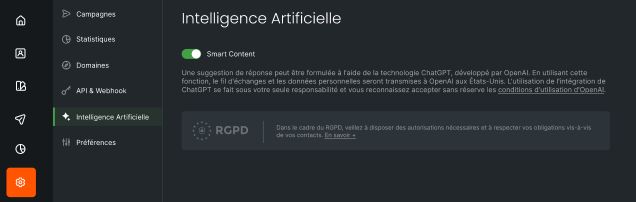
To deactivate or reactivate the Smart Content feature, it is very simple:
The account administrator must go to the settings of the Campaigns, Forms, Pages, Studio and Sendkit applications.
Then access the Artificial Intelligence menu.
Here, you have the option to deactivate or reactivate the Smart Content feature for all users of the account.
This flexibility allows you to fully control the use of artificial intelligence within your digital marketing strategy, by adapting it to your specific needs.